
How to Send a Fax Via Email
To send a fax using your @du.edu email account, please follow this procedure:
-
In the To field: type fax@du.edu
-
In the Subject field: type the appropriate prefix and the destination fax number* (with or without hyphens)
-
Local numbers in this format: fax number (ex: 3035551212)
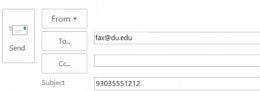
-
Long distance numbers in this format: area code + fax number (ex: 8885551212)
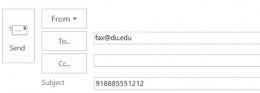
-
- Type a fax message into the email body and/or attach a file or multiple files.
- Allowed file formats: doc, docx, gif, jpeg, jpg, pdf, png, rtf, tif, tiff, txt, xls, xlsx.
- Send the email.
- A confirmation of fax transmission will be sent to your DU email address.
* A recipient can be added to the beginning of the Subject field if you are sending the fax as an “attention to”.
In this case, the Subject field should follow this format: Name ((destination fax number))
Examples:
Attn: Shared Services ((15555))
Lee Smith ((3035551212))
Accounting Department ((8885551212))
Link to knowledge base article