







Search Committee Review
Learn how to review applicants as a Search Committee Member.
This article applies to Search Committee Members and Hiring Managers.
Search Committee Members will receive emails when there are applicants for review. To view the applicants, click the link in the email OR login to Jobs@DU using the steps outlined below.
1. Log in to Jobs@DU
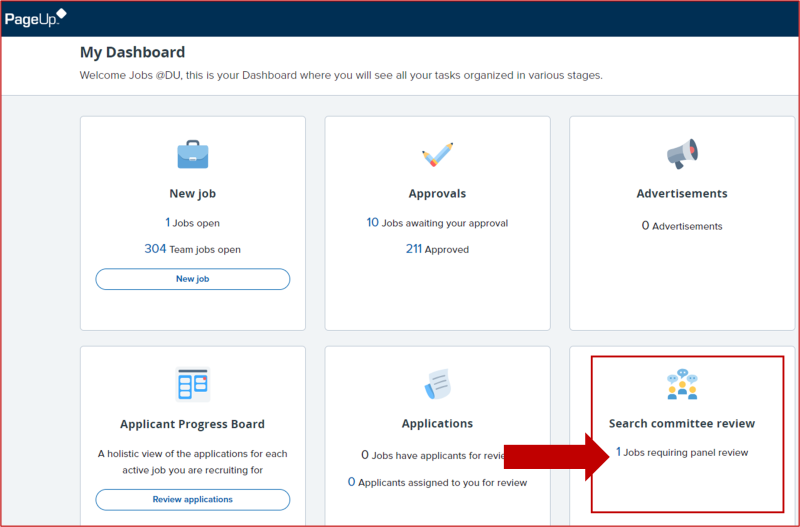
3. From the Jobs@DU homepage, click on the Jobs requiring panel review link.
If there are no Jobs requiring panel review, either:
- The Hiring Manager will need to add you to as a Search Committee Member in the Job Requisition.
- The Hiring Manager will need to move applicants to the Search Committee Member Review stage.
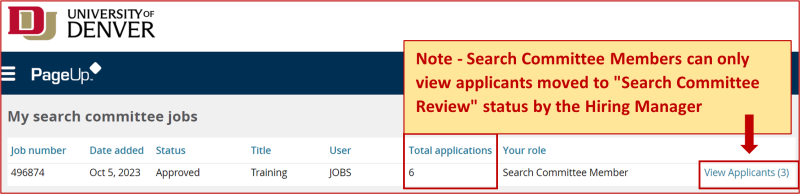
4. Click on View Applicants. Note: Although Search Committee Members can see the total number of applications for a job, they will only be able to view the candidates that are moved to the Search Committee Review stage by the Hiring Manager.
5. Select an applicant to rank using the check box on the left hand side.
6. Click the icons next to their name to review their resume and question responses.
7. Add your comments summary in the Summary section.

8. When finished, click Close.
Questions? Contact Jobs@du.edu.